
In October we launched Pagemoji, emoji reactions for any website. You pasted a line into Code injection, and readers could react to your posts with one click, without an account or cookies.
Reactions are now part of the customer portal. You switch them on under Reactions with no code to paste, and you can see what readers reacted to without opening every post. Your site stays as it is until you switch them on.
Under every post, or where you want them
By default, the emojis appear under every post. We add them from our side, so nothing goes into your theme or Code injection, and only posts get them. If you'd rather place them yourself, or show counts on your post cards, you get a snippet for your theme instead. You pick up to five emojis and one of three styles, and you can put a question above them.
See what readers liked
The Posts list shows every post readers reacted to, with the posts that got new reactions since you last looked at the top.
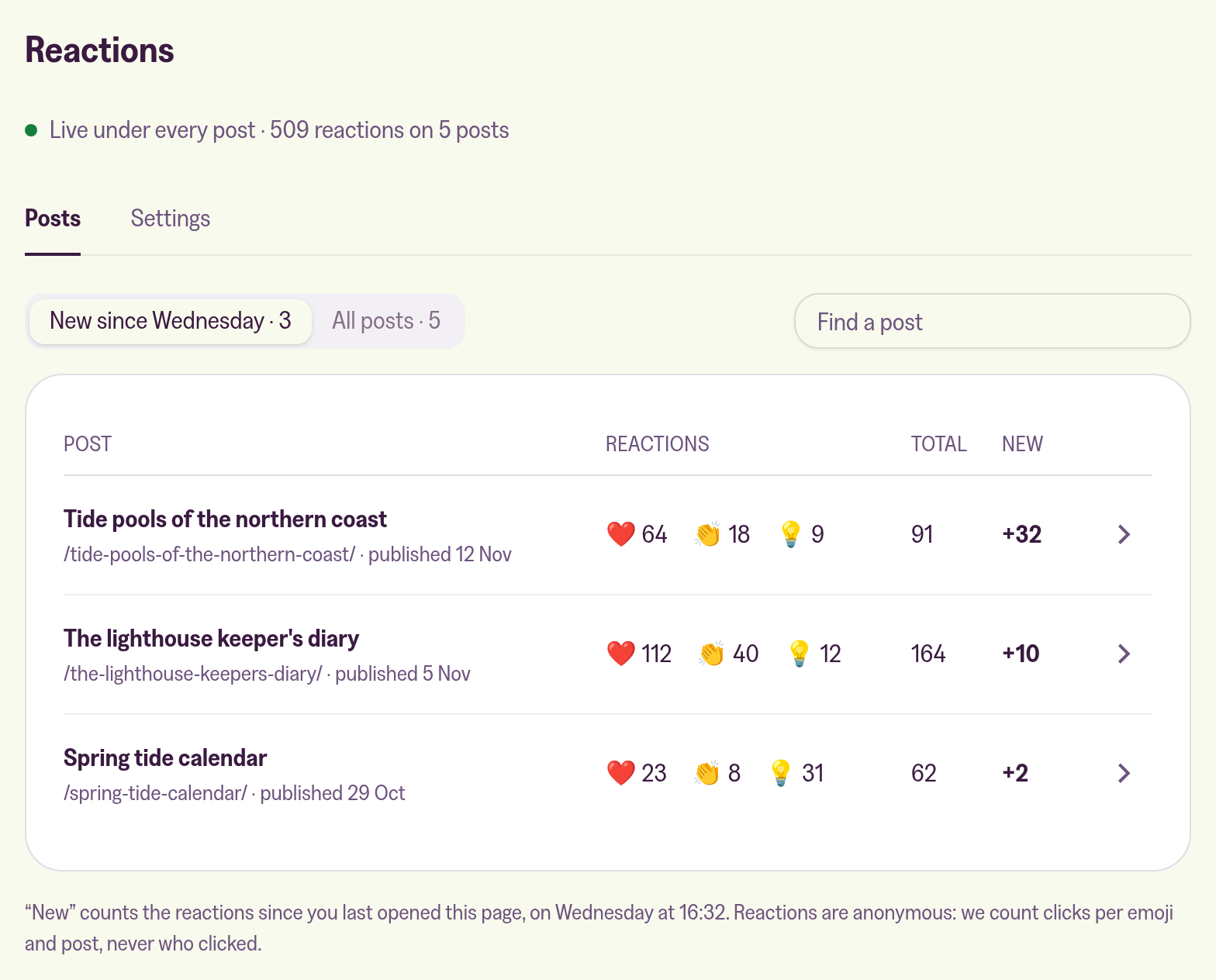
We don't send emails about reactions, and the portal shows no count of new ones. A reaction doesn't need an answer, and a count next to the one for contact messages would teach you to skim past both.
If you pasted Pagemoji into Code injection, your counts carry over, and the portal tells you when it finds your script. The help article explains how to let the portal take over:
