Can my subscribers reply to my newsletter?
Yes. Whether you need email forwarding depends on the From address your newsletter uses, and whether there's a mailbox behind it. Both cases, and how to switch forwarding on.
 Jannis Fedoruk-Betschki
Yes, they can always hit reply. Whether that reply reaches you depends on the From address your newsletter uses, and whether there's a mailbox behind it. Sometimes there already is, and sometimes email forwarding is what puts one there.
If you send from your own domain
Your subscribers see a From address at your own domain, something like newsletter@yourdomain.com, and replies are addressed there. So they reach your email provider like any other message for your domain.
If you have a mailbox on that domain, replies are already arriving in it. Nothing to switch on.
If you have no email on your own domain, forwarding is exactly the thing to use. Send from the subdomain rather than your main domain, and the replies come to us. The DNS record you added for send.yourdomain.com points at our mail servers, and that's what lets forwarding pick them up.
In Ghost, go to Settings → Newsletters, open your newsletter, and set Sender email address to something on that subdomain, like hello@send.yourdomain.com. Switch forwarding on and replies arrive in your personal inbox, without you running email for your domain at all.
That field only appears in Ghost once your own sending domain is set up. Before that, the From address isn't yours to change.
You can check which address your subscribers see. The Newsletter page in the customer portal shows it under Newsletter From address, and reads "Not configured in Ghost yet" if you never set one.
If you send from the default sending domain
This is every trial site, and any site still sending from mymagic.page. Your newsletter goes out from yoursite@mymagic.page, and there's no mailbox behind that address, so a reply isn't delivered anywhere.
Email forwarding fixes that. It takes everything arriving at that address and sends it to an inbox you name.
Turning it on
- In the customer portal, click Newsletter in the sidebar.
- Scroll down to Email Configuration and find the Email forwarding card at the bottom.
- Choose Forward to Personal Email.
- Enter the address you want replies to go to. Any address works, including a shared one your team already reads.
- Click Save forwarding.
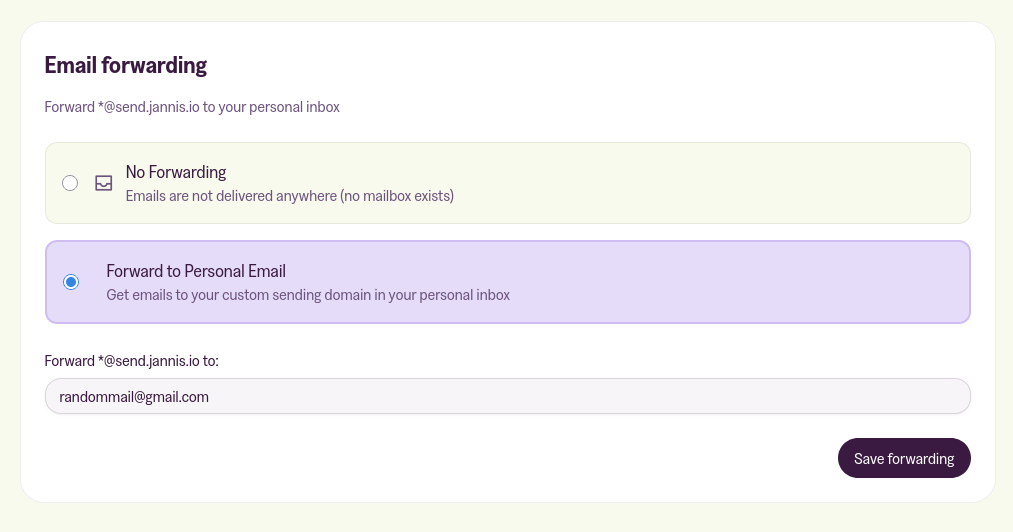
Forwarding starts working within seconds, and there's nothing to add to your DNS.
You get one destination, not a list. Saving a different address moves everything to the new one. To switch forwarding off, choose No Forwarding and click Disable forwarding.
What gets forwarded
On the default sending domain it's one address: yoursite@mymagic.page. Nothing else at mymagic.page reaches you, because that domain is shared with every other site using it.
If you have your own sending subdomain, forwarding covers every address at that subdomain. Mail to hello@send.yourdomain.com, replies@send.yourdomain.com or any other name there lands in the inbox you chose, and you don't create those addresses anywhere. That's why one From address on the subdomain is enough to receive replies without a mailbox of your own.
Automatic mail comes through as well, so expect the occasional out-of-office reply. Nothing is filtered out.
It only works in one direction
Forwarding brings mail to your inbox. It doesn't give you a mailbox on the domain it forwards from, so your reply goes out from your personal address, and that's the address your subscriber sees.
If nothing arrives
Check your newsletter's reply-to address. In Ghost, go to Settings → Newsletters, open your newsletter and look at Reply-to email. Leave it empty and replies go to the newsletter's own From address. Put an address in it and replies go straight there instead, wherever that address happens to live.
Check whether your sending domain changed. Changing it turns forwarding off, and the card tells you: "Forwarding disabled due to domain change. Please re-enable." Set it up again for the new domain.
Check that your sending domain is verified. Saving fails until its DNS records are in place, with a message asking you to verify the domain first.
Some older sites send from their main domain rather than a subdomain. That's the one setup where forwarding can be switched on and still catch nothing, because a main domain can't carry the DNS record that brings mail to us, so its mail goes to your own provider instead. Moving to a sending subdomain is worth doing for deliverability anyway, and configuring your sending domain covers how.
If you're on a custom plan
The Newsletter page has no Email Configuration section on a custom plan, so there's no card to switch on. Send us the address you want replies to go to and we'll set the forwarding up at our end.
More in this section

Didn't find your answer?
Ask us anything — a real person reads every message, usually the same day.
