Customising your search interface
How the search window looks to readers and what language it speaks. None of it is needed to make search work, all of it is there when you want it.
 Sviatoslav Huzel
None of this is needed to make search work. Advanced Search looks fine the moment you turn it on. These are the settings you come back to later, when you want the search window to match your site or to speak your readers' language.
Both sit under Settings in the Search tab, below the ranking controls.
Appearance
Five things to set, with a Preview underneath them so you can see each change before you save.
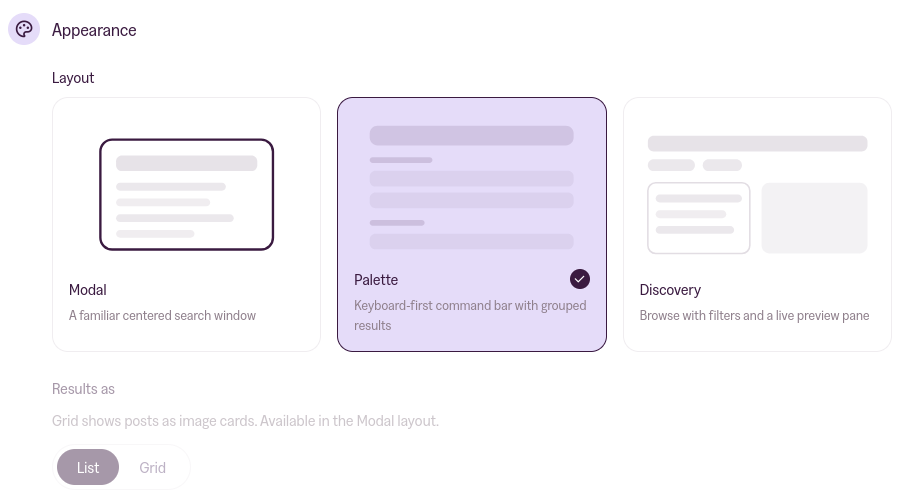
Layout
- Modal: a familiar centred search window. The right default.
- Palette: a keyboard-first command bar with results in groups. Suits documentation and reference sites, where people use search constantly and know what they're after.
- Discovery: a browsable pane with filters and a live preview of the highlighted result. Suits a large archive people want to explore rather than search.
Results as
List or Grid. Grid shows posts as image cards, and it's only available in the Modal layout. Pick Palette or Discovery and the Grid option greys out, and a Grid setting you'd saved earlier drops back to List on its own. That's expected rather than a fault, and it's easy to misread as one.
Theme
System follows your visitor's device settings. Light and Dark override it and always look the same.
This is the search window's own theme. It doesn't have to match your site, though on most sites System is the setting that makes it feel like it belongs.
Highlight matches
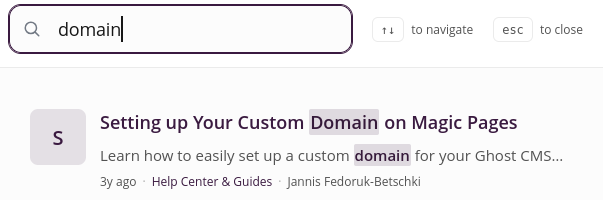
On by default. Readers see their search term picked out inside every result, so they can tell at a glance why a post came back. Turn it off if the highlighting fights with your design.
Reader filters
Turning Reader filters on gives readers chips to narrow their results by Topics, which are your tags, and by Authors. You can switch either chip off and keep the other.
Internationalization (i18n)
This is where the search window's text gets translated, and it starts with a Language picker.
Pick one of the presets and the whole search UI switches over at once. We ship complete translations for German, French, Spanish, Italian and Ukrainian. English is the default and the fallback. If your edits stop matching any preset, the picker shows a Custom pill instead.
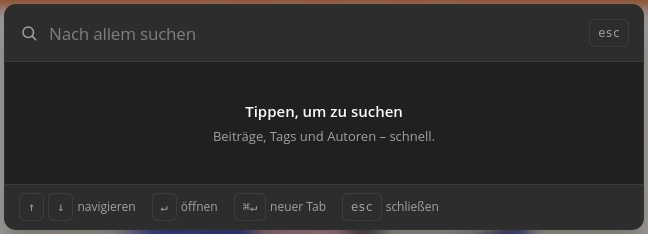
Underneath, Translatable strings lists every string as its own field, so you can fine-tune anything the preset got not-quite-right for your audience. Anything you leave blank falls back to English, and clearing a field puts the English back rather than saving an empty string.
The list changes with your layout. It only shows the strings your chosen layout actually displays, so a Palette site sees its group headings and a Modal site sees its keyboard hints. Change the layout in Appearance and the field set changes with it.
Below them, a collapsed section holds the ARIA labels. Those are what screen readers announce, so if you translate the visible text and leave these in English, anyone using a screen reader gets a half-translated interface. Do both, or neither. The presets fill both in for you.
Translating only affects the interface labels. Your posts and pages are never touched.
Worth doing if you publish in one non-English language. If your site is in English, skip this section entirely.
More in this section

Didn't find your answer?
Ask us anything — a real person reads every message, usually the same day.
