How to add withdrawal and cancellation pages to your site
Let readers in the EU withdraw from or cancel a paid membership on your own domain. How to set the pages up, and what to do with each request.
 Jannis Fedoruk-Betschki
Since 19 June 2026, anyone who sells online to consumers in the EU has to let them withdraw online as well. The rule comes from Directive (EU) 2023/2673. It asks for an easy-to-find link labelled "withdraw from contract here", a second step to confirm, and an email receipt with the date and time. The law firm Loyens & Loeff explains it in plain words.
If you sell paid memberships to readers in the EU, it's likely to apply to your site. In Germany, § 312k BGB also requires a way to cancel a subscription online.
Our withdrawal and cancellation pages give your site both, on your own domain. We host the pages, send the reader a receipt and email you every request. Cancelling and refunding stays with you, in Ghost Admin or Stripe.
The pages follow our reading of these rules. That isn't legal advice, and whether they meet the requirements for your site is up to you. If you're unsure, ask a lawyer.
What your readers see
The pages look like the rest of your site. We take your publication logo, accent colour and fonts from Ghost, and the background and header colours from Ghost or your theme. Without a logo, the page shows your site title. If a colour doesn't work on the page, change it under Look → Edit in the portal.
Readers don't need to log in. The withdrawal page asks for their name, email address and contract (for example the name of their plan). The button at the bottom says "confirm withdrawal".
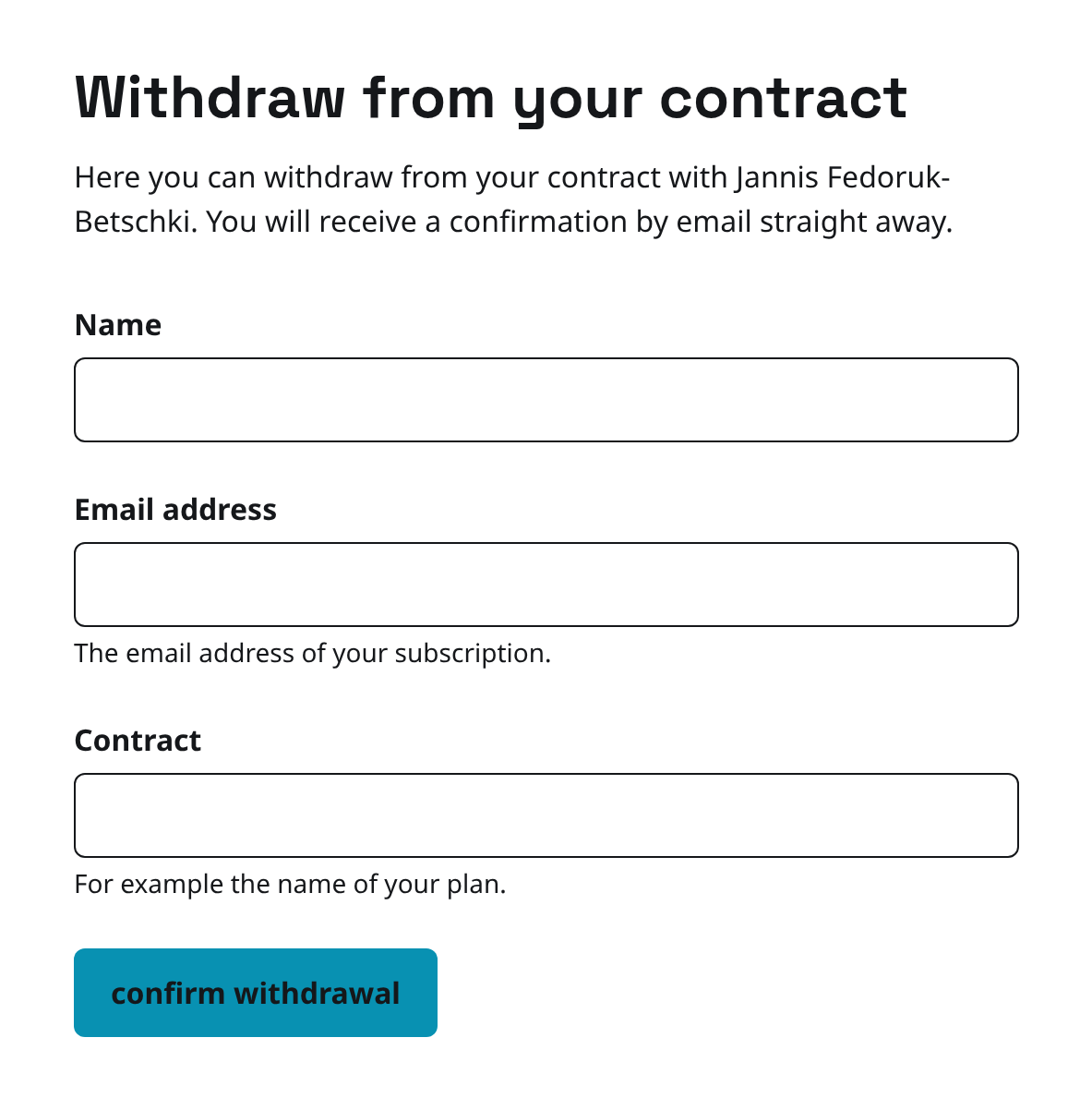
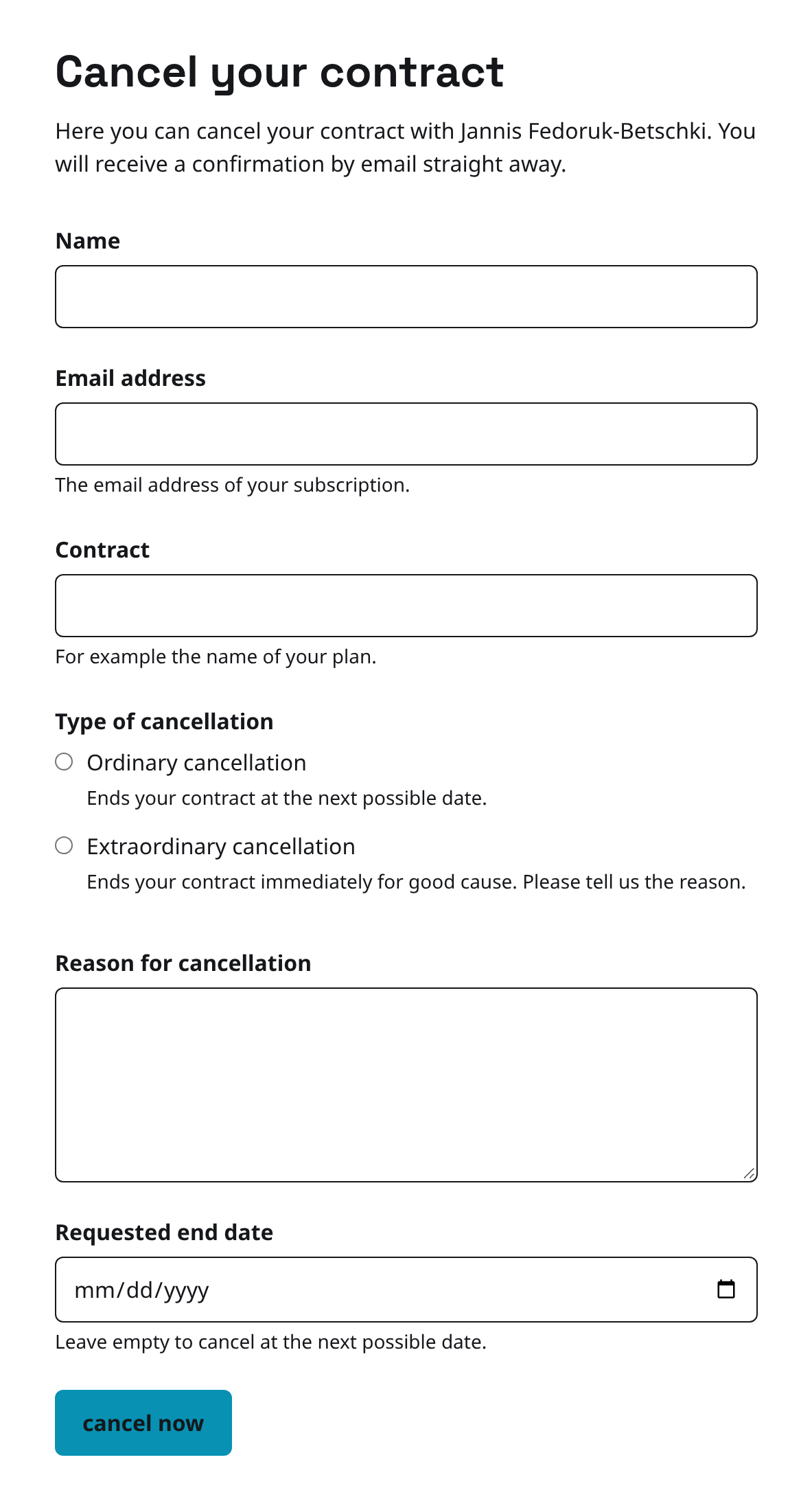
The cancellation page asks the same, and the reader picks a type of cancellation. We don't preselect one.
- An ordinary cancellation ends the membership at the next possible date, or on a later date the reader enters.
- An extraordinary cancellation ends it immediately for good cause, and the reader has to give a reason.
The button there says "cancel now".
After they submit, the reader sees the date and time we received it. They also get an email titled "Confirmation of your withdrawal" (or cancellation) in your site's name, listing what they sent.
What you need
- Stripe connected in Ghost. Until it is, the section shows Connect Stripe in Ghost first and you can't switch the pages on.
- A link to each page in your site's navigation, so readers can find it from every page. The setup gives you the link.
Setting up the pages
Log in to your Ghost admin and click Customer portal in the left sidebar. If you can't find it, here's where it lives:
 Jannis Fedoruk-Betschki
- Open Configuration and scroll to EU consumer law.
- Switch on the Withdrawal page, the Cancellation page, or both.
- Check the Page address. It starts as
withdrawandcancel(widerrufandkuendigenon a German site). You can use lowercase letters, digits and hyphens. Addresses Ghost needs for itself, like/ghost/or/members/, aren't allowed. - Under Where we send declarations, enter the email address that should get every request.
- Click Save changes. The badge shows Going live while we set up the address, then Live.
- Copy the Link for your navigation and add it in Ghost Admin under Settings → Navigation → Secondary navigation. Open navigation settings takes you there.
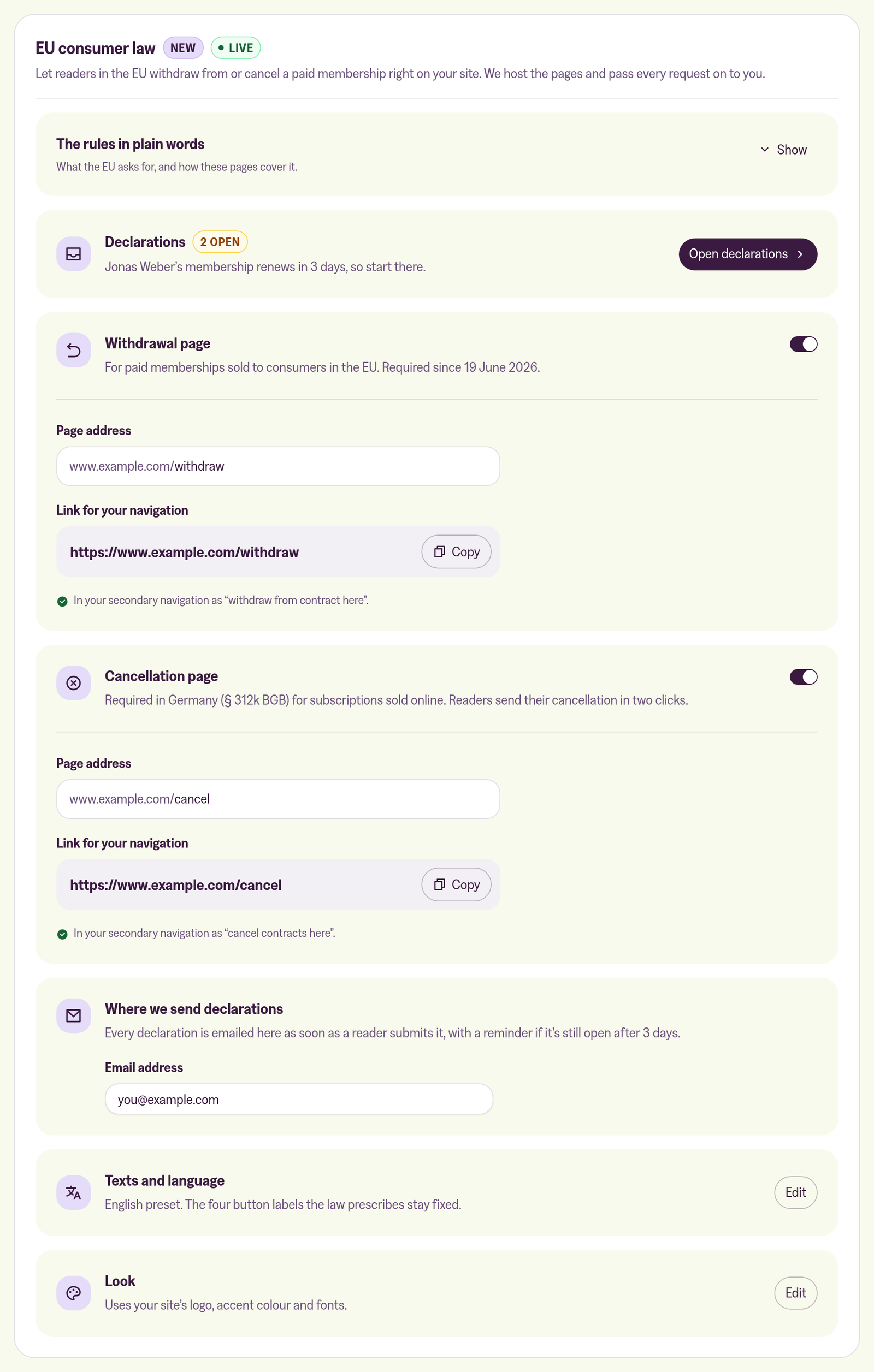
Name the menu items with the wording the law sets for them. In English that's "withdraw from contract here" and "cancel contracts here". Once a link is in your navigation, the portal shows it under the page. If it isn't, you'll see "We don't see this link in your navigation yet".
If you change the address of a live page later, the old link stops working when you save. Update your navigation at the same time.
Language and wording
The pages and the reader's receipt use one language: English or German. We start from your Ghost language, and any other language starts in English.
Under Texts and language, click Edit to change the wording. Four labels can't be changed because the law sets them: the link and confirm button on each page.
Handling a declaration
Every request arrives as an email titled "New withdrawal on" or "New cancellation on" your site's name. It also appears under Open declarations in the EU consumer law section. We match the reader's email address to your members, so each declaration tells you which membership it concerns and what to do next.
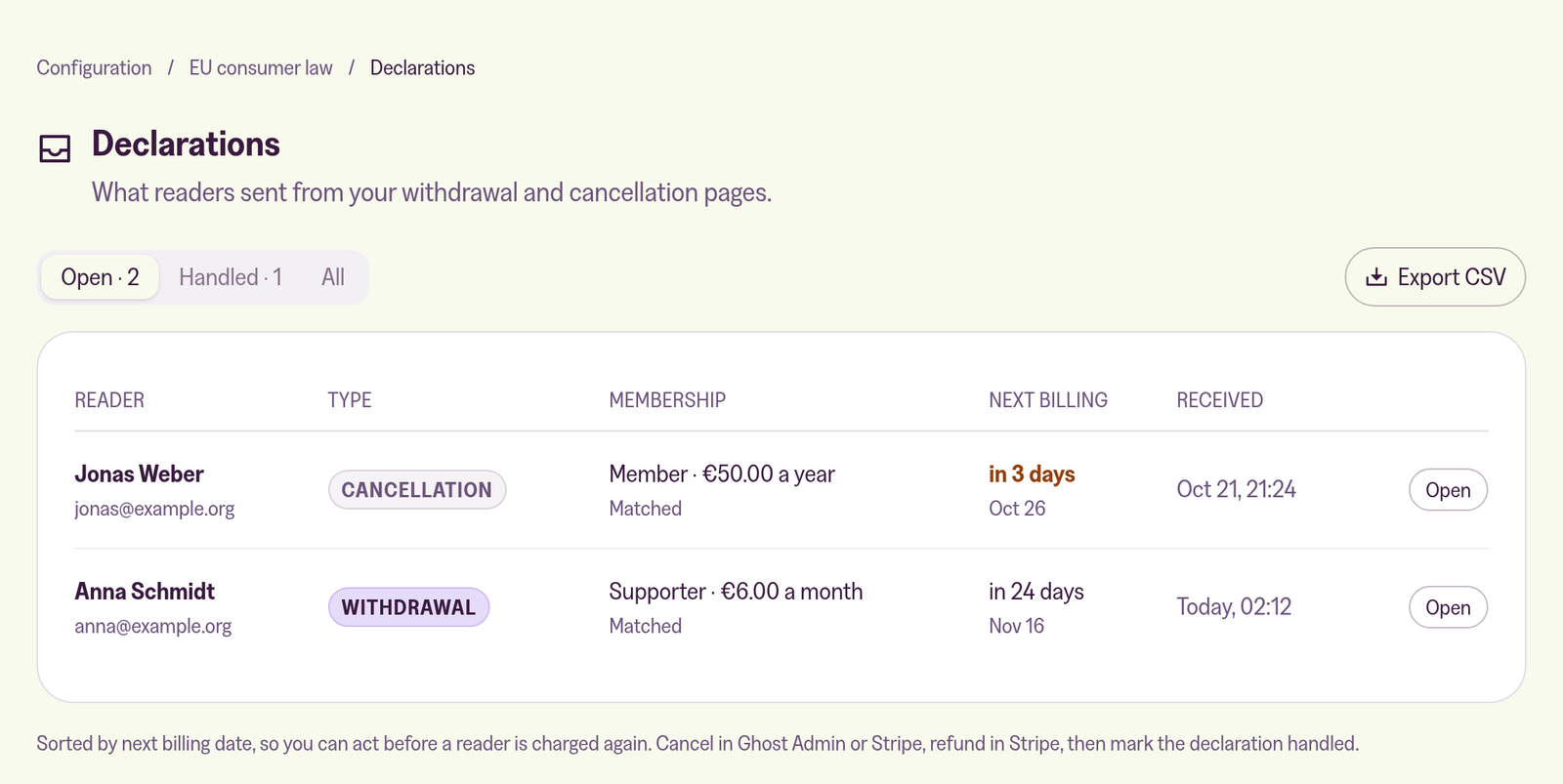
What you do depends on the type:
- Withdrawal: cancel the subscription immediately in Stripe and refund the payment under Payments. Ghost Admin can only cancel at the end of the period and can't refund, so this one happens in Stripe.
- Cancellation (ordinary): open the member in Ghost Admin and choose Cancel subscription. The membership stays active until the end of the period.
- Extraordinary cancellation: read the reason and decide. If you accept it, cancel immediately in Stripe. If you don't, reply to the reader.
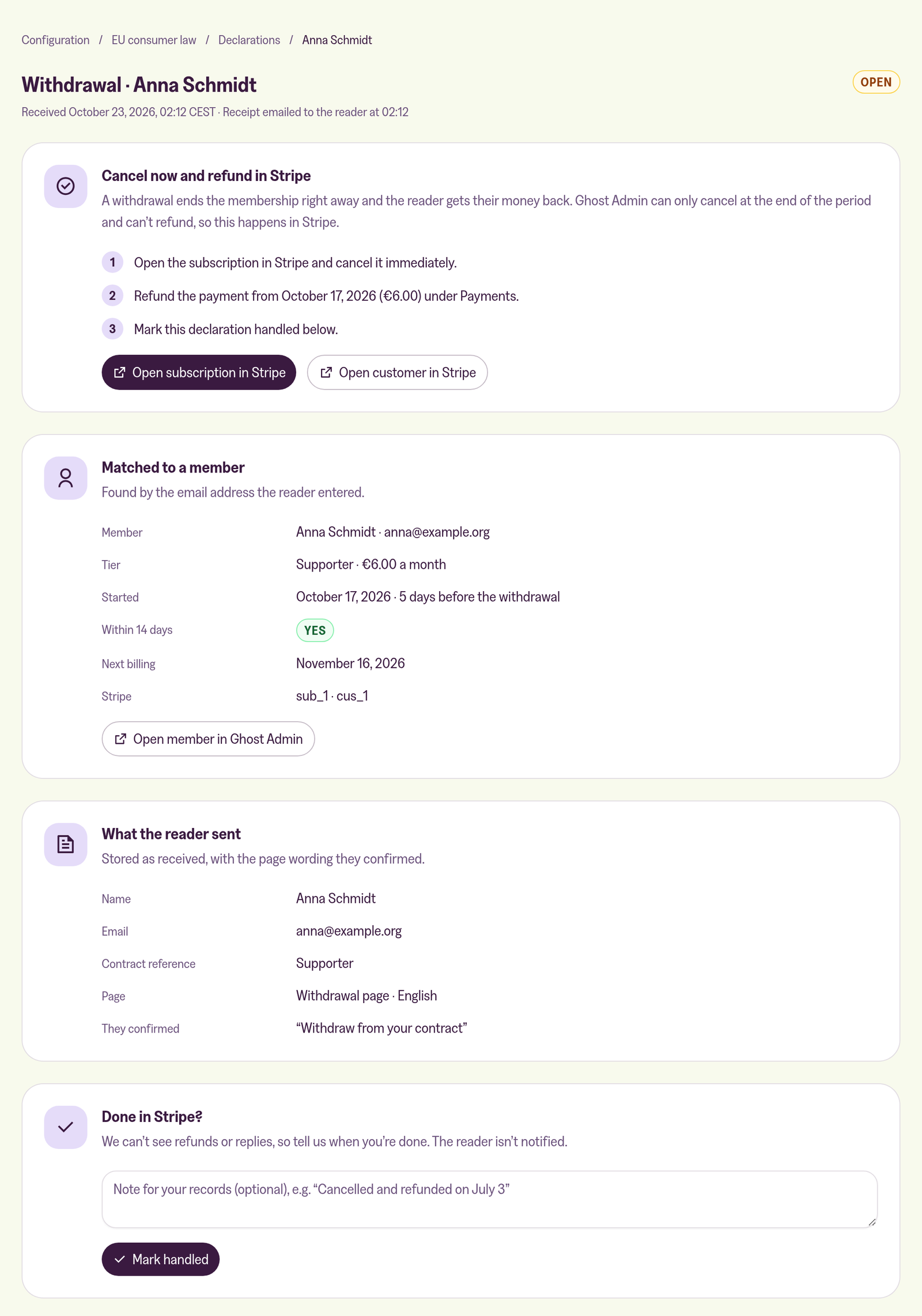
If no member uses the reader's email address, they probably joined with another one. Click Reply by email and ask, then handle it like any other request.
When you're done, click Mark handled. You can add a note for your records first. Marking a declaration handled doesn't notify the reader.
If a declaration is still open after 3 days, we send you a reminder. We also send one when the reader's next billing date is less than 5 days away, so they aren't charged again before you act. The declarations list is sorted by next billing date for the same reason.
What we don't do
We don't cancel subscriptions, refund payments or reply to readers, and we can't see whether you did. That's why you mark each declaration handled yourself.
More in this section

Didn't find your answer?
Ask us anything — a real person reads every message, usually the same day.
